Quick Summary
Buying shoes online is tricky because customers can’t try them on, which causes hesitation, returns, and lost sales. However, virtual shoe fitting tools fix this by letting shoppers see 3D shoes on their feet, view them from all angles, and sometimes get size suggestions. On WooCommerce, these tools plug in easily, increasing confidence, cutting returns, and keeping product catalogs easy to manage.
Here are our top three virtual shoe fitting software for WooCommerce at a glance:
# |
Tool |
Best For |
1 |
Fibbl |
Footwear brands that need production-grade 3D, scalable virtual try-on, and WooCommerce deployment |
2 |
Zakeke |
Smaller e-commerce stores looking for product customization paired with basic AR previews |
3 |
Vyking |
Sneaker-focused brands building mobile-first AR shopping experiences |
Why Selling Footwear on WooCommerce Still Has a Fundamental Problem
WooCommerce gives footwear brands serious flexibility. But people still can't try shoes on through a screen.
That gap drives hesitation, inflates return rates, and tanks conversion. Static product images, no matter how well-lit, don't answer the questions shoppers actually care about. How will these look on me? Will the proportions work? Does the material match what I'm expecting?
Virtual shoe fitting software closes that gap. It puts 3D models on shoppers' feet via AR, and let them rotate and zoom into product details. n some cases, it even recommends the right size based on a foot scan.
This guide walks through 9 platforms that work with WooCommerce stores, so you can figure out which one actually fits your brand's needs and growth trajectory.
Why Listen to Us?
Fibbl builds and distributes 3D product experiences exclusively for footwear and bag brands. Our platform powers virtual try-on and interactive 3D viewing for companies like Intersport, Sportland, and Zach Footwear.

Over the past year, we've tracked more than 31 million shopper interactions with 3D-powered product pages. That volume of real-world data gives us a grounded perspective on what actually moves the needle for footwear e-commerce.
What Is Virtual Shoe Fitting Software?
Virtual shoe fitting software gives online shoppers a way to experience footwear before buying, without stepping into a store.
Depending on the platform, shoppers can see a 3D shoe model overlaid on their feet through their phone camera or use an interactive viewer to spin and zoom. Some platforms also run a foot scan to recommend the best size, helping customers find the perfect fit without guessing.
For WooCommerce stores, these tools typically show up as a widget, plugin, or embed code on your product detail pages. The shopper clicks a button, points their camera at their feet, and gets a real-time preview of how the shoe looks. Some platforms skip AR entirely and focus on sizing accuracy through measurement technology instead.
The category includes lightweight AI-based photo overlays that improve product images quickly and easily. It also covers enterprise-grade systems that scan physical products, create sub-millimeter-accurate 3D models, and distribute them across all sales channels.
5 Benefits of Using Virtual Shoe Fitting Software on Your WooCommerce Store
Here's what footwear brands gain by adding virtual fitting technology to their WooCommerce product pages:
1. Lower Return Rates
Returns eat margins, and in footwear, the root cause is almost always a mismatch between what shoppers expected and what actually showed up. When customers can preview shoes on their own feet or explore them in 3D before ordering, those expectations get set correctly upfront. In fact, brands running 3D product visualization have reported a drop in return rates of up to 29.4%.
2. Higher Conversion Rates
Flat images leave too much to the imagination. But interactive product experiences, where shoppers can rotate, try on, and inspect, build the kind of confidence that turns browsing into buying.
3D product experiences have been shown to lift add-to-cart rates by 10.9%. For a category like footwear, where fit anxiety is the top conversion barrier, that lift matters.
3. More Time Spent on Product Pages
When you give shoppers something to interact with, they stay longer. More time exploring the product means more time building intent. In fact, brands using the 3D-first approach have measured up to an 80% jump in time-on-page for products with interactive experiences enabled.
4. Fewer Pre-Purchase Support Requests
"How does this shoe look from the side?" "Is the sole thick or thin?" "What does the texture actually look like?" These questions disappear when shoppers can answer them visually. AR try-on and detailed 3D viewing replace the back-and-forth that bogs down customer support teams.
5. A Clear Edge Over Competitors
The vast majority of WooCommerce footwear stores still rely on flat photography. Adding 3D or AR to your product pages immediately signals a premium, tech-forward shopping experience. It also separates your brand from competitors selling similar products with the same static image carousel.
7 Best Virtual Shoe Fitting Software for WooCommerce Stores
# |
Tool |
Key Features |
WooCommerce Integration |
Best For |
Pricing |
1 |
Fibbl |
AR try-on, sub-millimeter 3D scanning, variant switching, commerce analytics |
Lightweight embed code |
Enterprise footwear brands scaling full catalogs |
Starts at €999/month |
2 |
Zakeke |
Product customization, AR shoe preview, 3D configurator |
Native WooCommerce plugin |
Brands selling customizable footwear |
From $68/month |
3 |
Kivisense |
Real-time AR shoe try-on, QR activation, in-store mirrors |
WebAR via QR/link |
Footwear stores want QR-based AR |
Free to start; paid from $888/month |
4 |
WEARFITS |
AR try-on, foot scanning, size engine, 2D-to-3D conversion |
API/SDK integration |
Fit-focused footwear brands |
Starts at €449/month |
5 |
Mazing |
WebAR shoe try-on, browser-based, 3D model creation |
Native WooCommerce plugin |
DTC footwear brands are new to AR |
Quote available upon request |
6 |
GlamAR |
Multi-category AR, footwear try-on, 3D viewer |
Code snippet integration |
Fashion retailers selling across categories |
Depends on SKU count and usage |
7 |
KiXR |
Patented dual-foot tracking, social AR, video calling |
Plug-and-play for WooCommerce |
Campaign-driven footwear brands |
Custom pricing |
Here's a closer look at each platform:
1. Fibbl
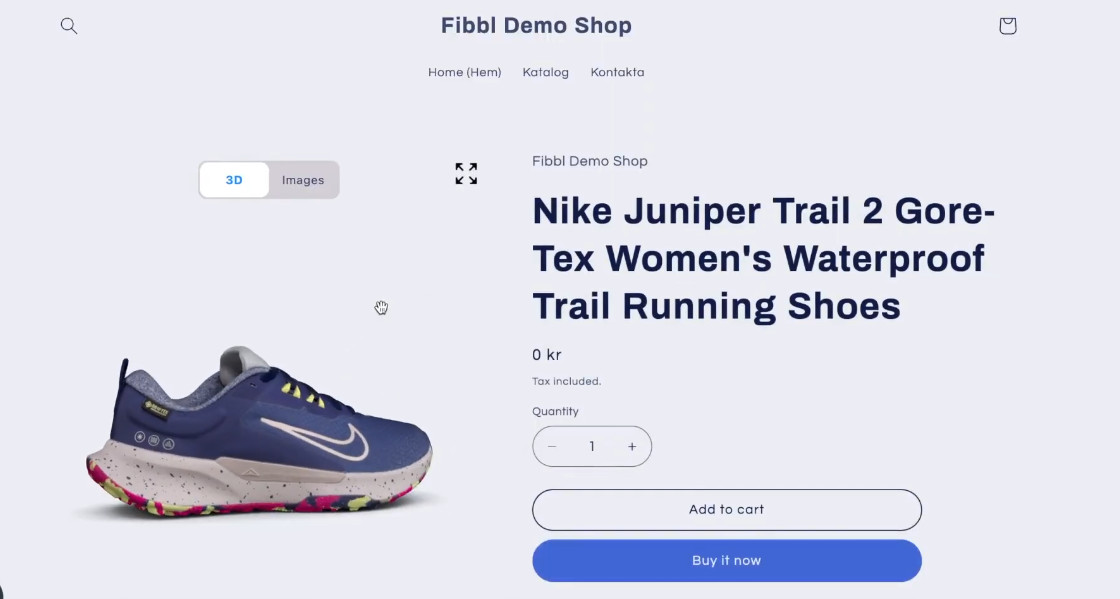
Fibbl is the only platform that handles the entire workflow, from scanning physical shoes to creating photorealistic 3D models. It also distributes these assets across every channel, including your WooCommerce store.
Most virtual fitting tools assume you already have 3D assets ready to go. But Fibbl eliminates that bottleneck entirely. Its proprietary scanning hardware captures footwear at sub-millimeter precision, and an automated reconstruction pipeline turns those scans into production-ready 3D models.
The system is designed to handle challenging footwear materials like polished leather, woven mesh, translucent rubber, and layered textiles. It maintains consistent fidelity across thousands of SKUs.
On the WooCommerce side, integration is a lightweight embed code that plays nicely with custom themes, page builders, and existing plugins. The 3D viewer and AR try-on also load only when a shopper engages with them, so there's no drag on page speed. Furthermore, you can manage which products have 3D experiences toggled on directly from the Fibbl dashboard.
Key Features
- Precision 3D Scanning for Footwear: Captures true-to-life colors, textures, and material details at sub-millimeter accuracy.
- Industrialized Production Pipeline: Processes full seasonal catalogs, dozens to thousands of SKUs, with consistent output quality.
- AR Shoe Try-On: Shoppers point their phone at their feet and see the shoe placed in real time, no app needed.
- Unlimited Content from One Capture: Generate any angle, 360° video, background variation, or lighting setup from a single 3D asset.
- One-Click Variant Switching: Customers toggle between colorways and styles without reloading anything.
- Performance Analytics: Monitor how 3D and AR affect add-to-cart, engagement, and return rates.
- Multi-Channel Distribution: Push 3D content to your WooCommerce store, social ads, retail partners, and B2B channels from one integration.
Pricing

Fibbl runs on three subscription tiers:
- Scale at €999/month, covers 3D viewer and product page integration.
- Excel at €1,399/month, adds AR try-on and virtual fitting capabilities.
- Enterprise custom pricing for brands with large-scale or multi-market needs.
Pros
- Best-in-class 3D accuracy, especially for complex footwear materials.
- End-to-end system, no need to source 3D models from separate vendors.
- WooCommerce embed is lightweight and theme-agnostic.
- Documented ROI: measurable lifts in conversion and drops in returns.
- Built to handle full-catalog seasonal refreshes.
Cons
- Focused exclusively on footwear and bags.
2. Zakeke

Zakeke started as a product customization engine and has expanded into 3D visualization and AR try-on. It supports footwear alongside eyewear, jewelry, headwear, and other categories. The WooCommerce integration is native; install the plugin, connect your account, and you're running. For footwear brands offering personalized or made-to-order products, Zakeke's real strength is letting shoppers configure components (colors, materials, and details). They can also preview their custom design in 3D or AR before checkout.
Key Features
- AR Shoe Preview: Shoppers use their phone camera to see shoes placed in physical spaces.
- Real-Time 3D Customization: Customers personalize footwear elements and see changes rendered instantly.
- Direct WooCommerce Plugin: Installs from the WooCommerce marketplace with no custom development needed.
- Order Workflow Automation: Handles production files for made-to-order and print-on-demand footwear.
- Usage and Conversion Tracking: Monitors how shoppers interact with customization and AR features.
Pricing
Four plan tiers:
- Starter $68/month.
- Grow $170/month.
- Scale $255/month.
- Enterprise with account-specific pricing.
The virtual try-on feature is billed as a usage-based add-on to these plans.
Pros
- Smooth WooCommerce setup through a native plugin.
- Robust customization and configuration tools.
- Works across multiple e-commerce platforms beyond WooCommerce.
Cons
- Shoe try-on is a bolt-on, not a core focus; realism is limited.
- Costs escalate with per-use VTO pricing on larger catalogs.
- Not optimized for the material complexity of footwear.
3. Kivisense

Kivisense offers WebAR-powered shoe try-on activated through QR codes. Shoppers click a "try on" button on your product page, scan a QR code with their phone, and see the shoes placed on their feet in the mobile browser.
The platform has a native Shopify app, but for WooCommerce stores, you embed the try-on experience via QR codes and WebAR links placed on product pages. Besides, Kivisense has worked with well-known brands, including Gucci and Adidas, on AR footwear campaigns.
Key Features
- QR-Activated AR Try-On: Shoppers scan and launch try-on instantly on mobile.
- Browser-Only Access: No app or download required.
- Multi-Style Support: Works with sneakers, sandals, casual shoes, hiking boots, and more.
- Custom Try-On Links: Generate shareable links and QR codes for marketing use.
- Smart Mirror for Retail: Extends AR try-on into physical store environments.
Pricing
- Commercial $888/month (up to 10 SKUs, no watermarks).
- Enterprise custom pricing for larger product catalogs.
Pros
- Free tier available to test the experience.
- Strong underlying AR technology, used by major global brands.
- The QR approach works for both online and offline campaigns.
Cons
- QR code step adds friction versus in-page AR activation.
- The commercial tier is expensive relative to the 10-SKU cap.
- WooCommerce integration is manual, with no native plugin.
4. WEARFITS
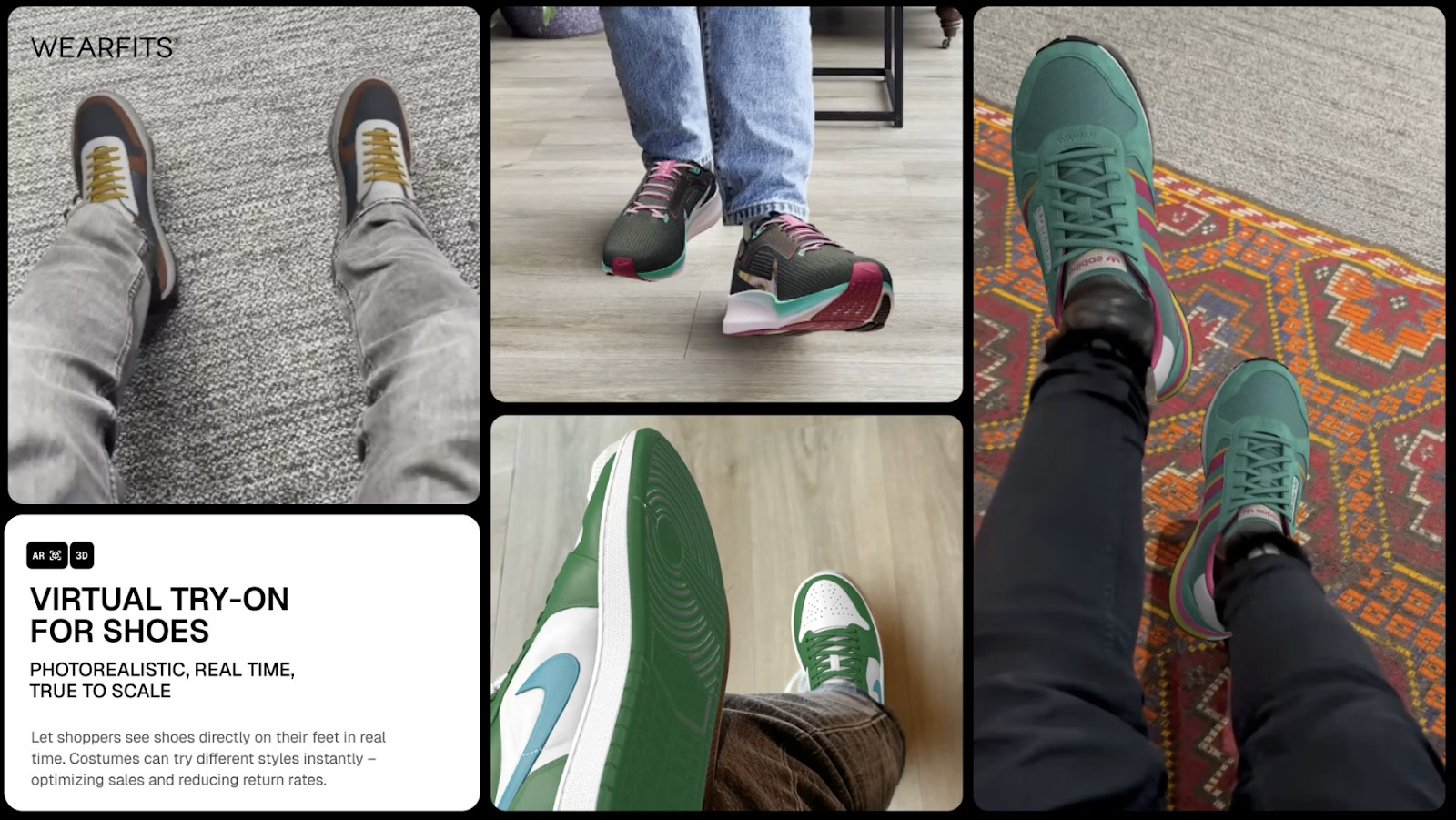
WEARFITS bundles visual try-on with fit technology. The platform offers AR shoe try-on alongside AI-powered foot measurement, size recommendations, and automatic 2D-to-3D model conversion.
For WooCommerce, integration runs through the WEARFITS API and SDK. The platform appeals to brands where size-related returns are the primary pain. It's not just showing shoppers how shoes look, but actively guiding them to the correct size.
Key Features
- AR Footwear Try-On: Realistic shoe placement on web, mobile apps, and in-store digital mirrors.
- Automated 3D from Photos: Converts standard product photography into 3D models using AI.
- Phone-Based Foot Scanning: Captures six-foot dimensions through the mobile camera.
- Personalized Size Engine: Recommends the right size based on individual foot data and shoe-specific fit profiles.
- Omnichannel Support: Same technology works online, in-app, and in physical retail.
Pricing
Four plans:
- Starter at €449/month.
- Pro at €1,499/month.
- Scale at €4,999/month.
- Enterprise with custom pricing.
Pros
- Uniquely combines visual try-on with fit/size technology.
- AI-driven 3D model creation keeps asset production costs down.
- Strong data layer for understanding fit-related return patterns.
Cons
- Visual realism trails platforms that use physical scanning hardware.
- Requires developer resources for API/SDK setup.
- The support team is unresponsive.
5. Mazing

Mazing is a WebAR platform that works as a confirmed WooCommerce partner. It offers browser-based shoe try-on, AR product visualization, and 3D model creation as a bundled service.
If you don't have 3D models of your products, they'll create them from photos. Integration with WooCommerce is direct. The platform supports plugins and API-based embedding for all major shop systems.
Key Features
- Browser-Based Shoe Try-On: AR experiences launch directly in mobile browsers with no app install.
- WooCommerce-Native Integration: Supported as an official shop platform partner.
- 3D Model Production: Creates models from product photos when brands don't have existing assets.
- Social-Optimized Sharing: Try-on experiences designed for sharing across social channels.
- Brand-Matched Styling: Customize AR interface elements to fit your store's look.
Pricing
Mazing offers three plans: Starter, Growth, and Scale. Pricing for all tiers is available upon request.
Pros
- One of the few platforms with direct WooCommerce plugin support.
- Fast to deploy, no app dependency for shoppers.
- Good option for brands just starting with AR.
Cons
- AR realism depends heavily on the quality of source photos.
- Less specialized for footwear than dedicated shoe platforms.
- Fit accuracy is limited; this is a visual try-on, not sizing technology.
6. GlamAR

GlamAR is a multi-category AR platform that covers footwear alongside jewelry, eyewear, beauty products, and home decor. The platform provides virtual try-on, 3D product viewers, and configurator tools.
WooCommerce integration is available through code snippets or an API, and is compatible. But it requires some technical setup. GlamAR is a practical choice for fashion retailers that sell shoes as part of a broader product mix and want one AR vendor across categories.
Key Features
- Multi-Category Virtual Try-On: Handles shoes alongside jewelry, glasses, watches, and beauty products.
- Interactive 3D Product Viewer: 360-degree exploration of footwear from every angle.
- Quick-Load AR Previews: Optimized for fast rendering during e-commerce browsing.
- Adaptable Integration: Works with WooCommerce, Shopify, and Magento via code snippet or API.
- Shopper Analytics: Tracks how customers engage with AR and 3D content.
Pricing
GlamAR offers three plans (Starter, Growth, and Scale). Pricing depends on SKU count, monthly view volume, and platform requirements.
Pros
- Efficient if you need AR across shoes plus other product categories.
- Partner brands report meaningful conversion improvements.
- No app required for shoppers.
Cons
- Footwear is one supported category among many, not the primary focus.
- WooCommerce setup may need developer assistance.
- You'll need AR-ready 3D models or pay extra for creation.
7. KiXR

KiXR builds immersive AR try-on technology purpose-built for shoes. Their patented system tracks both feet simultaneously, creating a convincing on-foot visualization that holds up as shoppers move.
For WooCommerce, KiXR offers plug-and-play SaaS integration and supports WordPress, WooCommerce, Magento, and custom platforms. A unique differentiator is their AR video-calling feature, which lets shoppers share a live try-on session with up to 6 friends or family members for real-time feedback.
Key Features
- Patented Dual-Foot Tracking: Follows both feet simultaneously for natural-looking placement.
- 360° Interactive AR: Shoppers can swivel, zoom, and walk around in the try-on view.
- AR Video Calling: Invite up to six people to watch the try-on session live and give feedback.
- Photo-Based 3D Creation: Builds 3D shoe models from just 3–4 product photographs.
- WooCommerce Plug-and-Play: SaaS-based integration across major e-commerce platforms.
Pricing
Custom pricing. You pay only for active SKUs.
Pros
- Built specifically for footwear from the ground up.
- Social and video-sharing features are unique in the market.
- Low barrier for 3D model creation (just send product photos).
- Straightforward WooCommerce integration.
Cons
- No transparent pricing.
- Catalog management tools are limited for enterprise-scale operations.
- More engagement-focused than fit-focused.
Honorable Mentions
Here are 2 more virtual shoe fitting platforms worth considering. These don't list WooCommerce support but state they work with any e-commerce platform through web embeds or SDKs:
# |
Tool |
Description |
8 |
Vyking |
Mobile-first AR try-on built for sneakers and lifestyle footwear. Powers virtual try-on for Timberland, Marks & Spencer, and Under Armour. Integrates via web-based SneakerKit SDK. Custom pricing. |
9 |
Wanna Fashion |
AI-powered shoe try-on with luxury-grade realism. Used by Balenciaga and FARFETCH. Supports the widest range of footwear styles from sneakers to high heels. Integrates via low-code web SDK. Custom enterprise pricing. |
How We Chose the Best Virtual Shoe Fitting Software
Here's what shaped our selection and ranking:
- WooCommerce Compatibility: Every tool on this list integrates with WooCommerce. Some through native plugins, others via embed codes, SDKs, or APIs. We confirmed compatibility for each and noted the technical effort required for the integration.
- Footwear Support: We verified that each platform explicitly supports shoes as a product category. General-purpose AR tools without demonstrated footwear capability didn't make the cut.
- Visual Quality and Realism: We compared how faithfully each platform reproduces real footwear, materials, proportions, construction details, and color accuracy. Higher realism means better expectation-setting and fewer returns.
- Scalability: We looked at whether each tool can handle growth, from a handful of products up to full seasonal catalogs with hundreds or thousands of SKUs. This includes asset creation capacity, variant management, and production pipeline efficiency.
- Integration Complexity: We assessed how quickly and cleanly each tool connects to a WooCommerce store. Native plugins scored higher than solutions requiring custom development.
- Capabilities: We compared what each platform actually does, AR try-on, 3D viewing, size recommendation, product customization, and analytics to map where each tool fits in the landscape.
Why Fibbl Is the Right Fit for 3D-First WooCommerce Stores
Most virtual shoe fitting platforms were built to add an AR overlay to your product page. They work fine when you already have 3D assets ready and only sell on one channel.
But footwear brands managing seasonal catalogs across WooCommerce, social, retail partners, and B2B don't have the luxury of stitching together separate vendors for scanning, modeling, and deployment.
That's where Fibbl fits. It covers the full chain, from scanning physical shoes to distributing production-grade 3D across every touchpoint. Brands go live on WooCommerce without sourcing 3D models separately, and scale to thousands of SKUs without the workflow falling apart.
So, book a call to see what 3D-first commerce looks like on your WooCommerce store.
Virtual Shoe Fitting Software for WooCommerce: FAQs
1. Will virtual fitting tools slow down my WooCommerce store?
Well-built platforms avoid this entirely. Fibbl, for example, uses lazy-loaded components that only activate when a shopper interacts with them, meaning zero impact on initial page load. That said, always test any new tool against your Core Web Vitals before going live across your catalog.
2. Can virtual fitting replace traditional size charts?
Not on its own. Virtual fitting shows how a shoe looks, not how it fits internally. Size recommendation tools address the fitting question with measurement data. But the most effective setup pairs virtual fitting for style confidence with sizing technology for fit confidence.
3. Is there real evidence that virtual fitting reduces returns?
Yes. Brands that have deployed Fibbl's 3D product experiences have recorded a 29.4% reduction in return rates. When the visual matches reality, fewer people return products. Whereas low-quality AR won't produce the same results, though. So, accuracy matters.
4. Can I run two tools at the same time on WooCommerce?
Absolutely. Many brands pair a virtual fitting platform like Fibbl with a dedicated sizing tool. They solve different problems and can coexist on the same product page. Just test that both load properly and don't conflict with each other or your theme.