Quick Summary
Most Shopify footwear stores struggle with thin collection pages, duplicate URLs, and content that doesn’t match buyer intent. These 9 SEO strategies help footwear stores improve rankings, attract qualified traffic, and turn search visibility into more sales.
Most Shopify footwear stores are sitting on significant SEO potential. They have product catalogs, category pages, and a blog, but none of them is working together in any systematic way.
The result is predictable. Thin category pages that Google ignores, product pages competing for the same keywords, and a content strategy built around topics no one is searching for.
Footwear is a competitive e-commerce category. Ranking for generic terms like “running shoes” or “leather boots” against established retailers is not a viable strategy for most brands. But that doesn’t mean organic traffic is out of reach. It means you need a more precise approach.
Here we have 9 strategies built around how Shopify actually works, what footwear buyers actually search for, and how to turn search visibility into measurable sales.
Why Listen To Us?
Fibbl works exclusively with footwear and bag brands, helping them build and scale 3D product experiences across their entire catalog. We’ve processed over 31 million consumer interactions through 3D product experiences and work with leading brands, including Samsonite, Gant, and Tumi.
That proximity to footwear e-commerce, catalogs, conversion data, and content challenges reflects our insights in this guide.
Strategy 1: Use Moneyball SEO To Target Keywords You Can Realistically Win
Most footwear stores build their SEO strategy around the most obvious terms in their category, high search volume, and broad intent. The problem is that those terms are owned by publishers with 50+ referring domains and years of authority.
Moneyball SEO works differently. Instead of chasing the biggest keywords, focus on clusters of specific, lower-competition terms that drive qualified traffic. A single well-optimized page can realistically rank in the top three and generate consistent results.
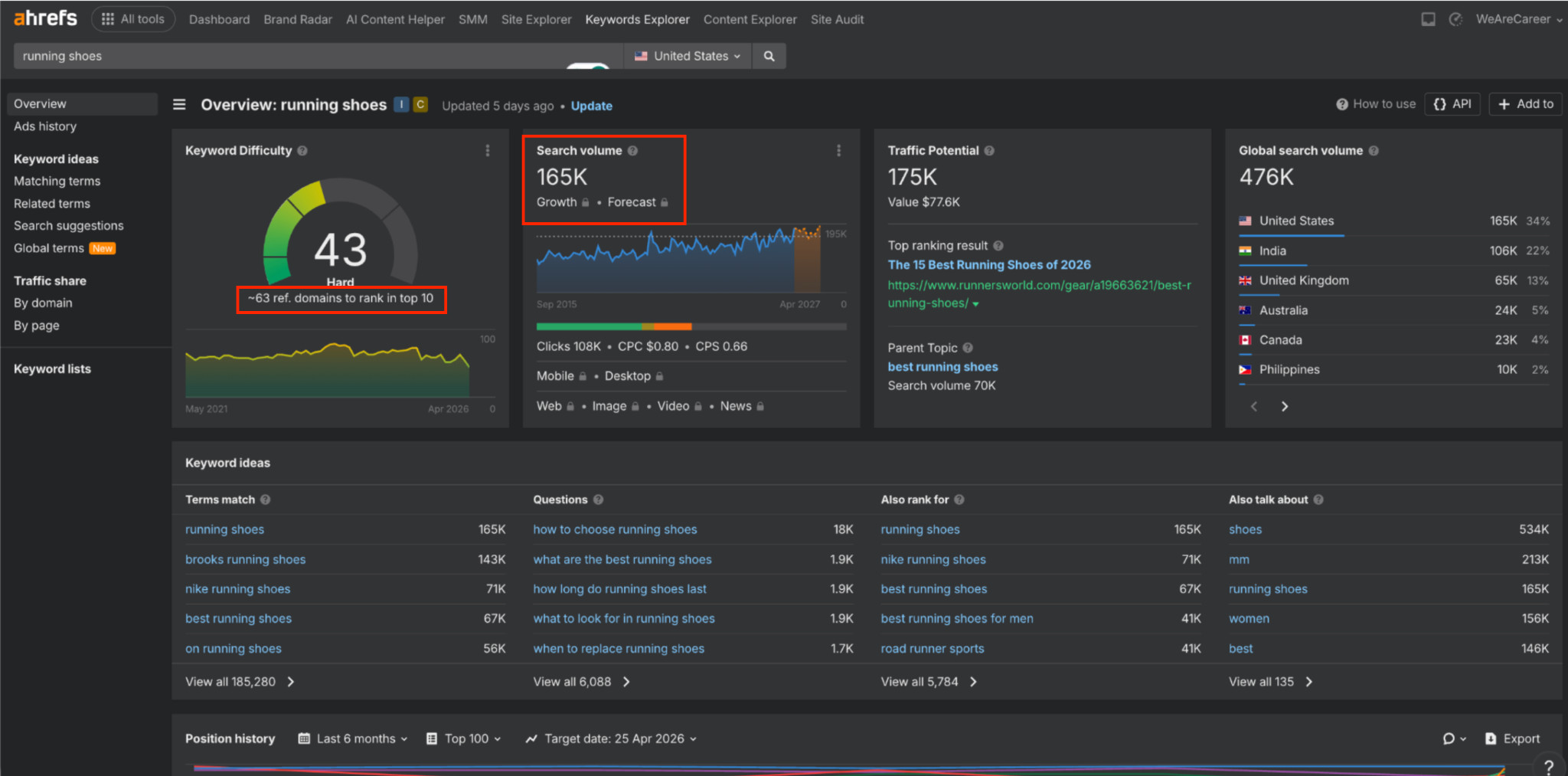
Take “running shoes” as an example. Here’s what ranking for it actually requires:
Now look at what three niche variations of the same category require:
Keyword | Search volume | Difficulty | Traffic potential |
Running shoes for flat feet | 2.9K | KD 10 — Easy | 12K |
Best trail running shoes for men | 2.4K | KD 6 — Easy | 26K |
Best running shoes for beginners | 4.6K | KD 3 — Easy | 5K |
To rank for “running shoes,” you need ~63 referring domains. To rank for all three alternatives above, you need ~22 combined, across three pages, each targeting a different buyer type.
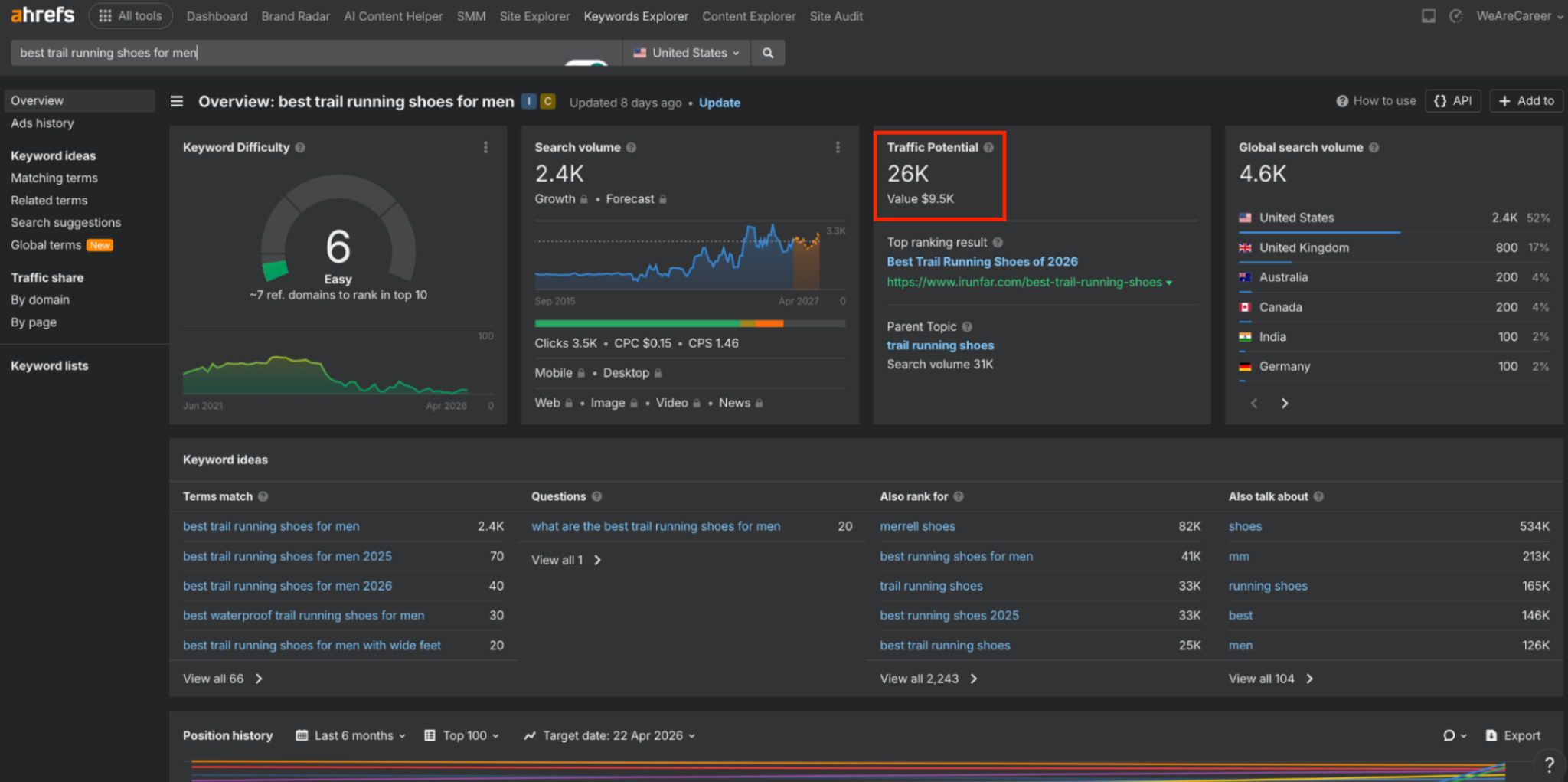
Notice the traffic potential column. “Best trail running shoes for men” has a KD of 6 but a traffic potential of 26K. That gap exists because a page ranking for this term automatically pulls in an entire cluster of related queries. The raw search volume alone would make most stores skip it. That’s exactly why the opportunity is still open.
To find your own Moneyball keywords, open Google Search Console and filter for queries ranking between positions 5 and 20. Then expand in Ahrefs with a KD filter below 20 and sort by traffic potential rather than search volume. That column is where the real opportunities are.
Strategy 2: Prioritize Collection Pages Over Product Pages
Most e-commerce stores spend time optimizing individual product pages while their collection pages sit thin and ignored. In organic search, excluding paid channels like Google Shopping and paid ads, the majority of traffic comes from collection pages, not product pages. That’s where the priority should be.
Collection pages target broader keywords, attract more traffic, and build site authority faster. That said, the decision between a collection page and a product page should never be a guess. The SERP tells you exactly what Google wants to see for any given keyword. Always search your target keyword and look at what’s ranking on page one. If most results are category or collection pages, build a collection page. But i most results are individual product pages, build a product page for each. This one check will save you from building pages that can never rank because they’re the wrong type for the intent.
Apply this to every new page you plan to create. Before anything else, ask: Can this be a collection page? If yes, default to that.
Finding Collection Page Ideas
If you’re unsure which collections to build, search your seed keyword on Google and switch to the Images tab.
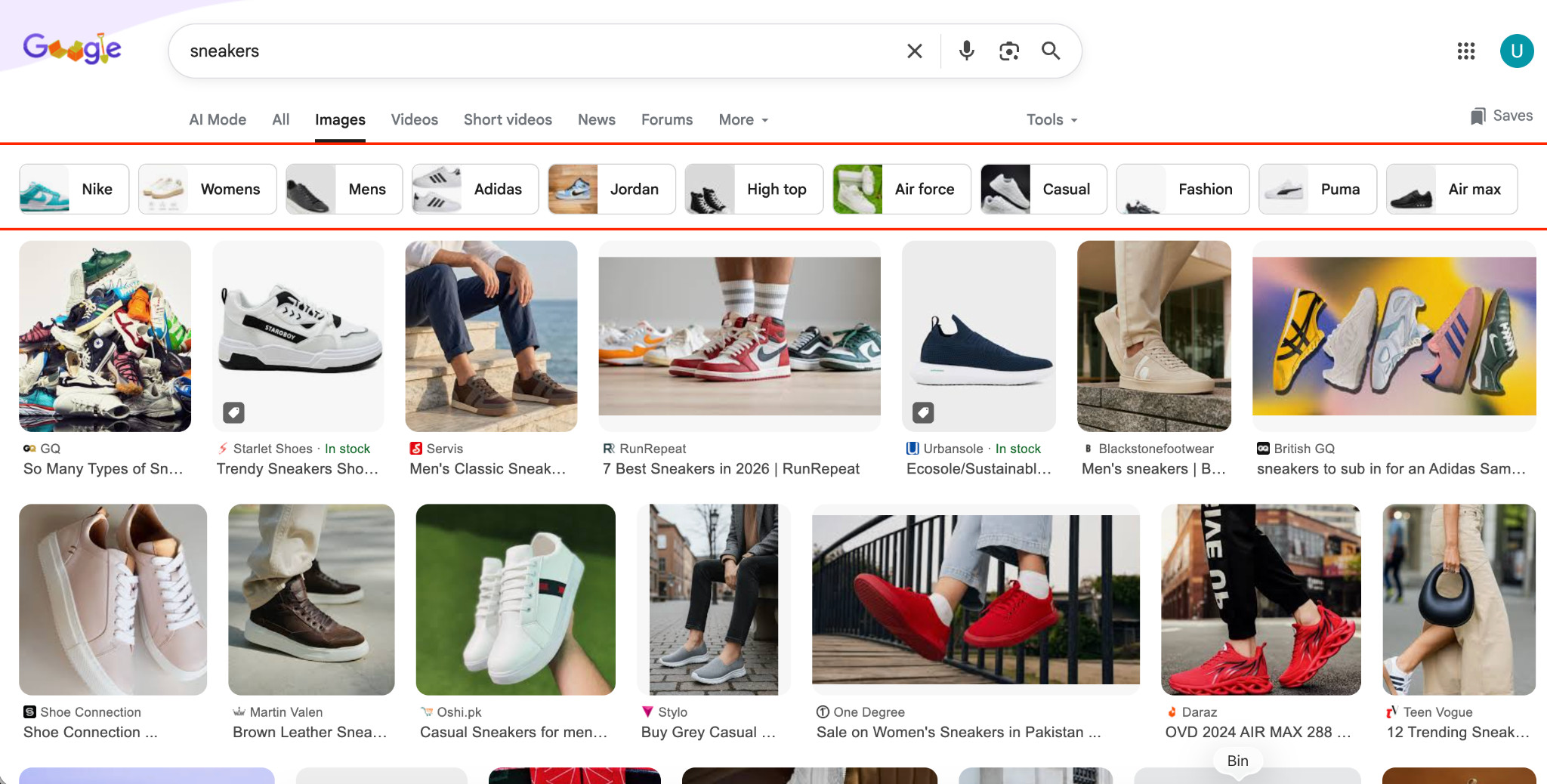
The filter suggestions at the top reflect what users commonly search for. Search for “sneakers,” and you’ll see filters like casual sneakers, leather sneakers, white sneakers, and women’s sneakers, each a potential collection page.
Strategy 3: Optimize Your Collection Pages With Content and FAQs
Many store owners avoid adding content to collection pages because they think it hurts the shopping experience. Their logic is that users come to browse and buy, not to read.
Take Revolve’s Ballet Flats collection page as an example:
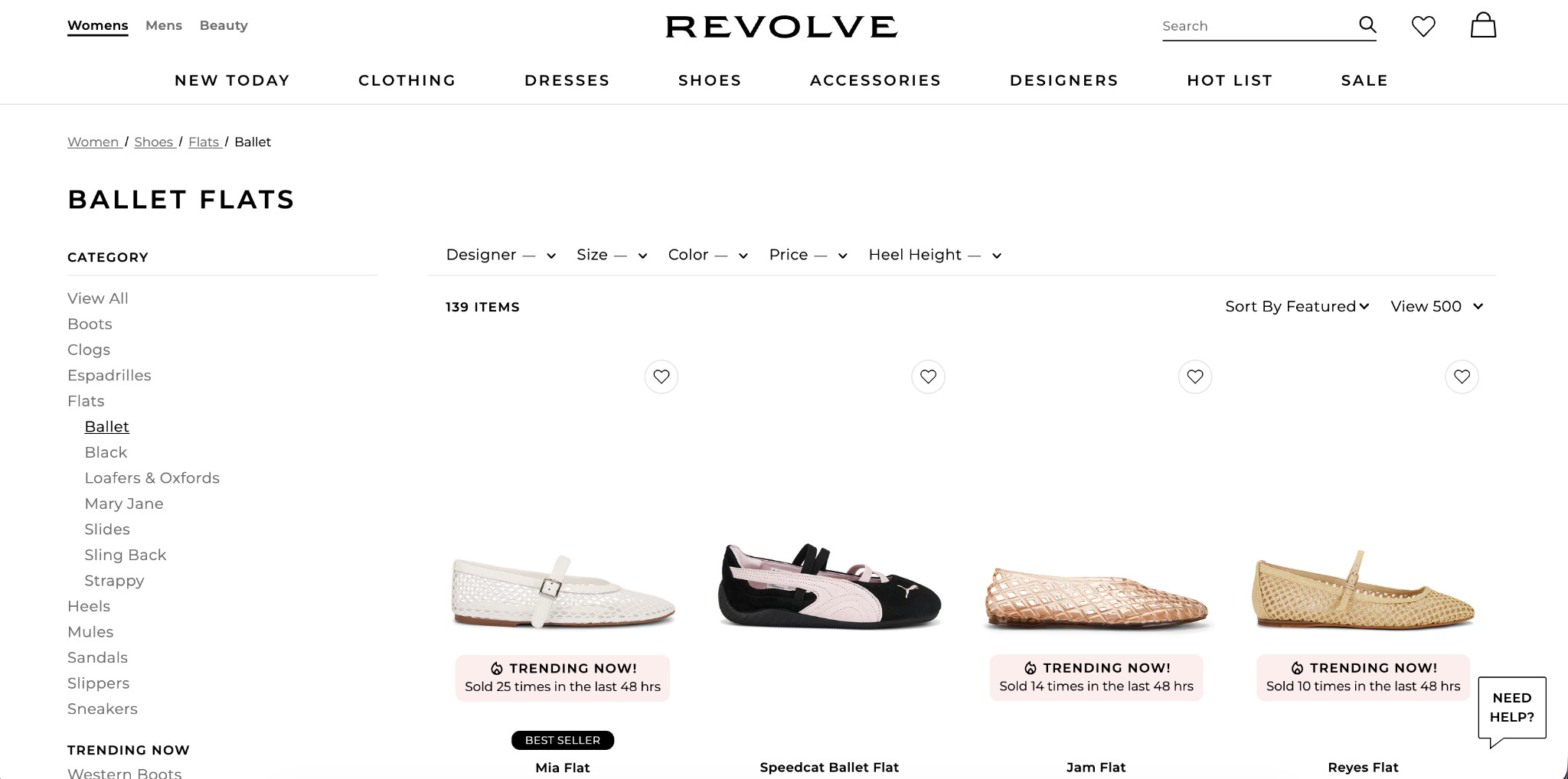
The page looks clean from a UX perspective: a heading, a few filters, and 139 products neatly listed. But from an SEO standpoint, there’s very little context behind it.
There’s no supporting copy, no topical depth, and almost no signals helping Google understand the relationships between products, use cases, or buyer intent. As a result, pages like this often underperform in organic search, even on strong domains.
The fix usually comes down to two things:
- Add supporting content below the product grid. Keep the top of the page focused on products, then use the lower section to explain the category, buying considerations, and product differences. This helps build topical relevance and gives Google stronger ranking signals.
- Add an FAQ section targeting real buyer questions from Google’s “People Also Ask” results. Even a handful of strong FAQs can capture long-tail searches and answer purchase doubts directly on the page.
The structure that works:
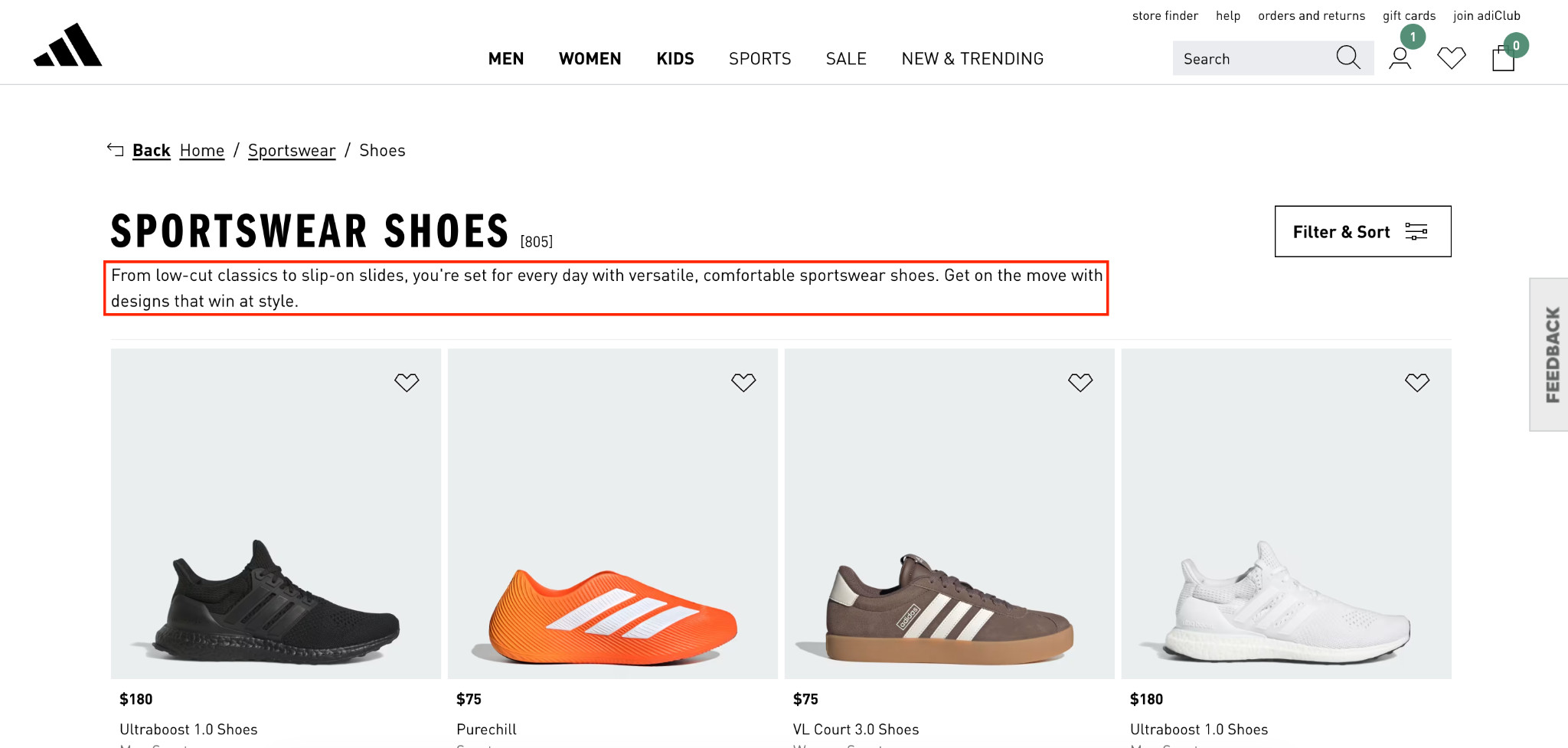
- Above the fold: 1–2 line intro, clean product grid with filters
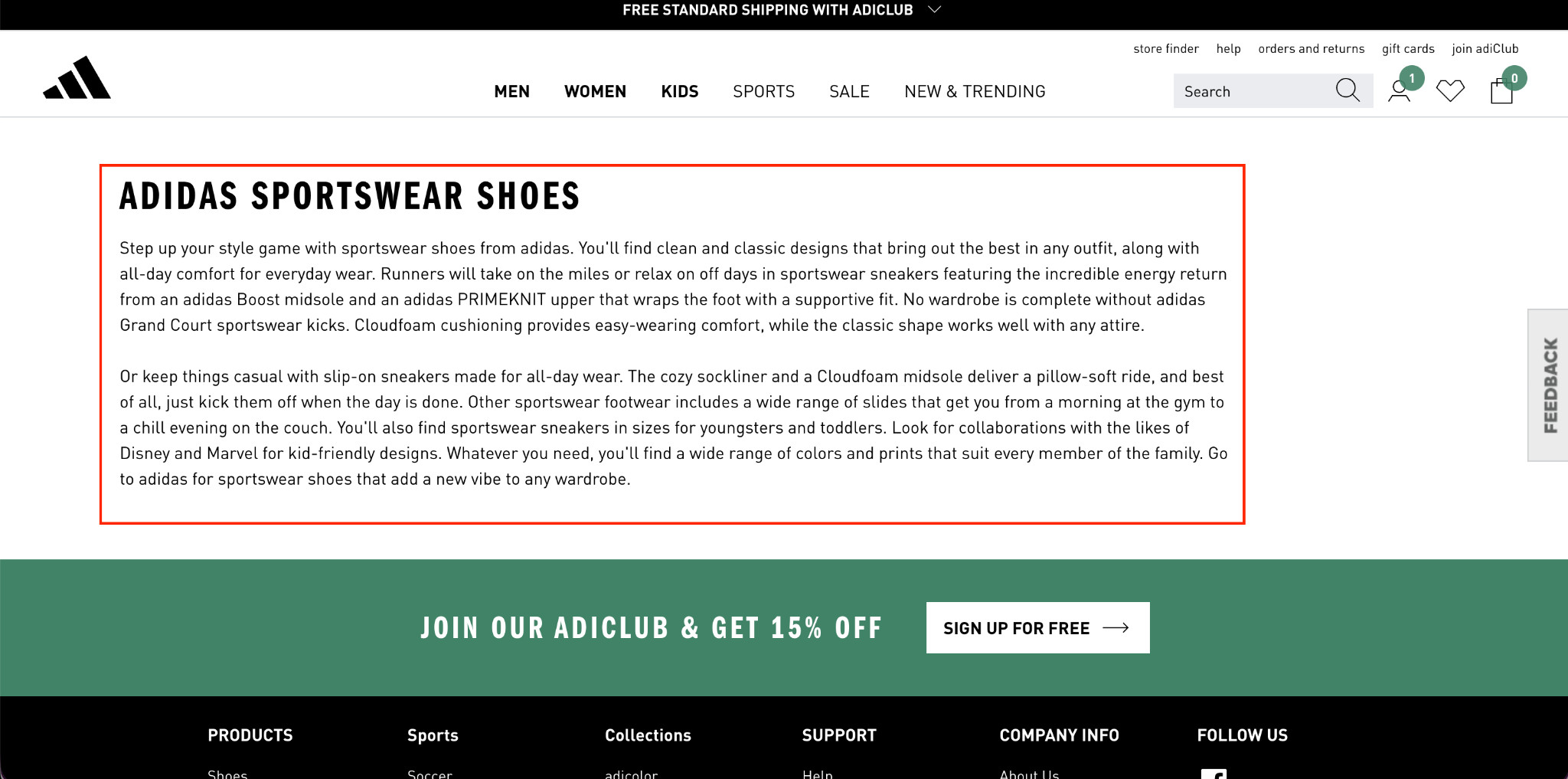
- Below the fold: 400–600 words covering the category, buying considerations, and your brand’s angle
- Bottom of page: FAQ section with 5–8 questions targeting real buyer queries
Never leave a collection page blank. It is the single most common SEO mistake in footwear e-commerce and one of the easiest to fix.
Strategy 4: Internally Link Your Collection Pages to Each Other
Most Shopify footwear stores already have basic internal links through navigation menus, breadcrumbs, and homepage collections. But navigation links are not the same as contextual links, and confusing the two is one of the most common missed opportunities in e-commerce SEO.
Contextual internal links are links placed within a page’s content that point to other relevant collection pages. These carry more SEO value than standard navigation links because they pass link equity directly. They also strengthen topical relevance and help Google understand how your collections connect.
Look at how Adidas handles this on their collection pages:
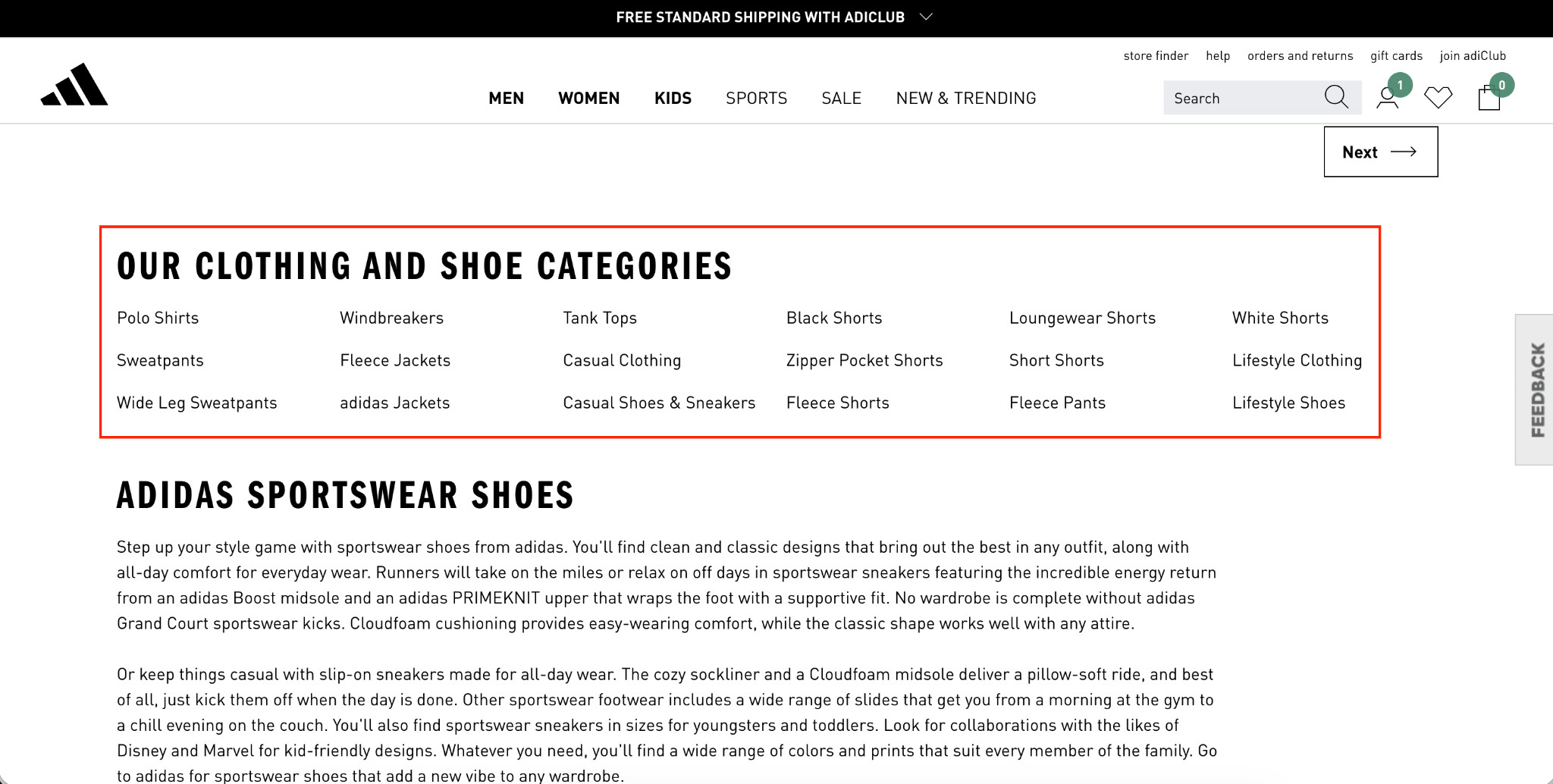
They include a dedicated categories section on collection pages that links out to related collections. This is not navigation. These are contextual links embedded within the page itself, connecting related collections and passing authority between them.
For a footwear store, the same logic applies:
- A trail running shoes collection page should link to your hiking footwear collection.
- Your leather sneakers page should link to your casual sneakers collection.
- A dress shoes page should link to formal footwear or Oxford shoes.
These connections make sense to the buyer and also make sense to Google.
This improves crawlability, distributes link equity across important collections, and strengthens topical relevance across the catalog.
Do this for every collection page you build. Ask which other collections a buyer browsing this page might logically want to explore next, and link to them contextually within the page content.
Strategy 5: Set Up Pagination Correctly
Most footwear stores use infinite scroll or “load more” buttons on collection pages. Both feel like good UX decisions. But both can create serious SEO problems.
As Google Search Central explains, “Google generally crawls URLs found in the href attribute of <a> elements. Google’s crawlers don’t ‘click’ buttons and generally don’t trigger JavaScript functions that require user actions to update the current page contents.”
Here’s what that often looks like in practice:
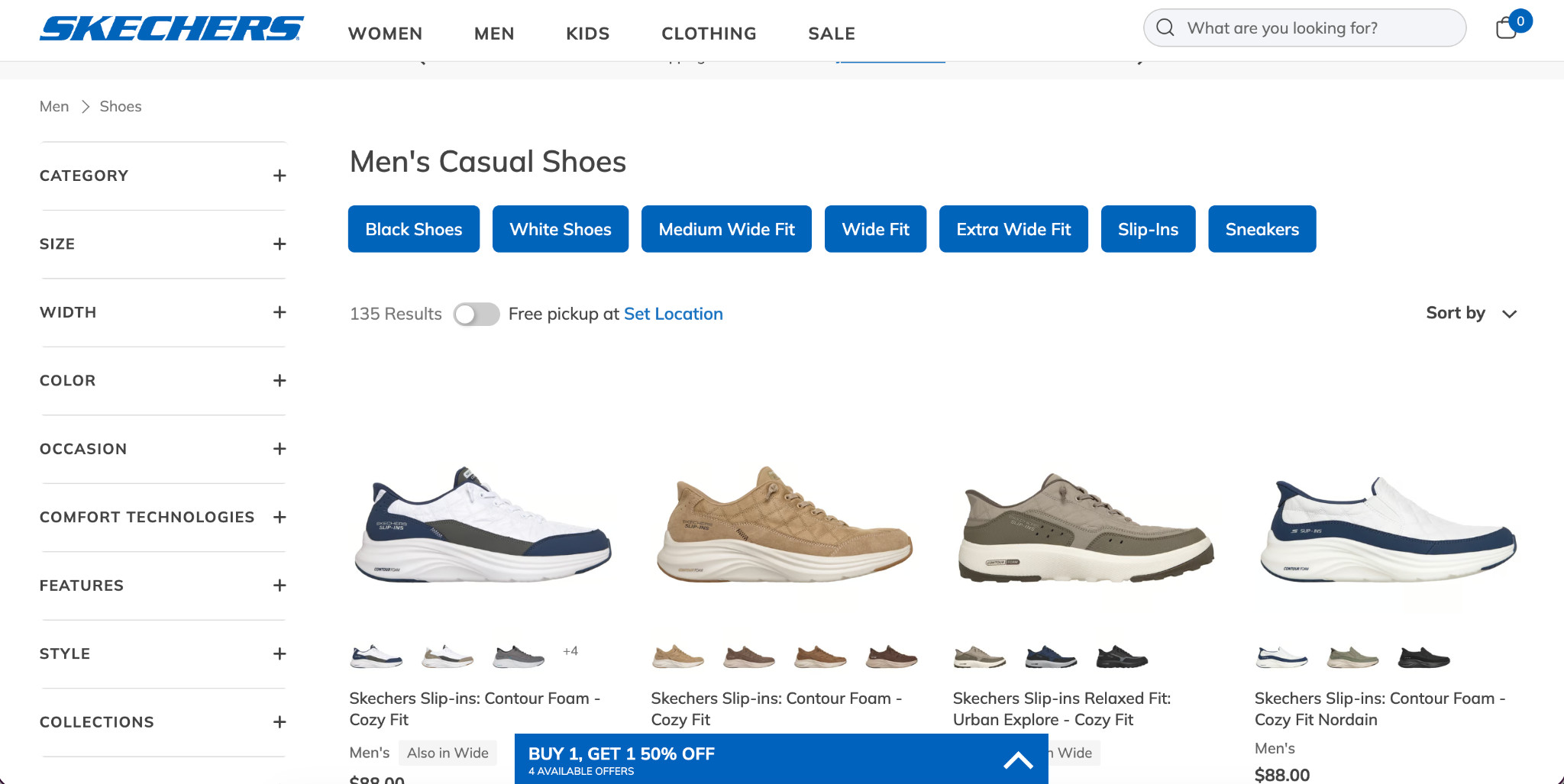
Filter buttons like these are often triggered by JavaScript rather than standard HTML links. If products load dynamically underneath them, Google may never see a large portion of the catalog. On collection pages with 100+ products, that can mean dozens of products missing from the search entirely.
The safer setup is standard pagination, where every page has its own crawlable URL in the HTML source:
/collections/running-shoes?page=2 /collections/running-shoes?page=3
To verify your setup, hover over pagination links and check whether a URL appears at the bottom of the browser. Then open the page source and search for that URL. If it exists in the HTML, Google can access it directly. In case it does not, your paginated products are likely hidden from search.
Strategy 6: Optimize your Google Merchant Center Feed
When someone searches for a product on Google, they usually see two types of results: standard organic listings and the Shopping grid at the top.
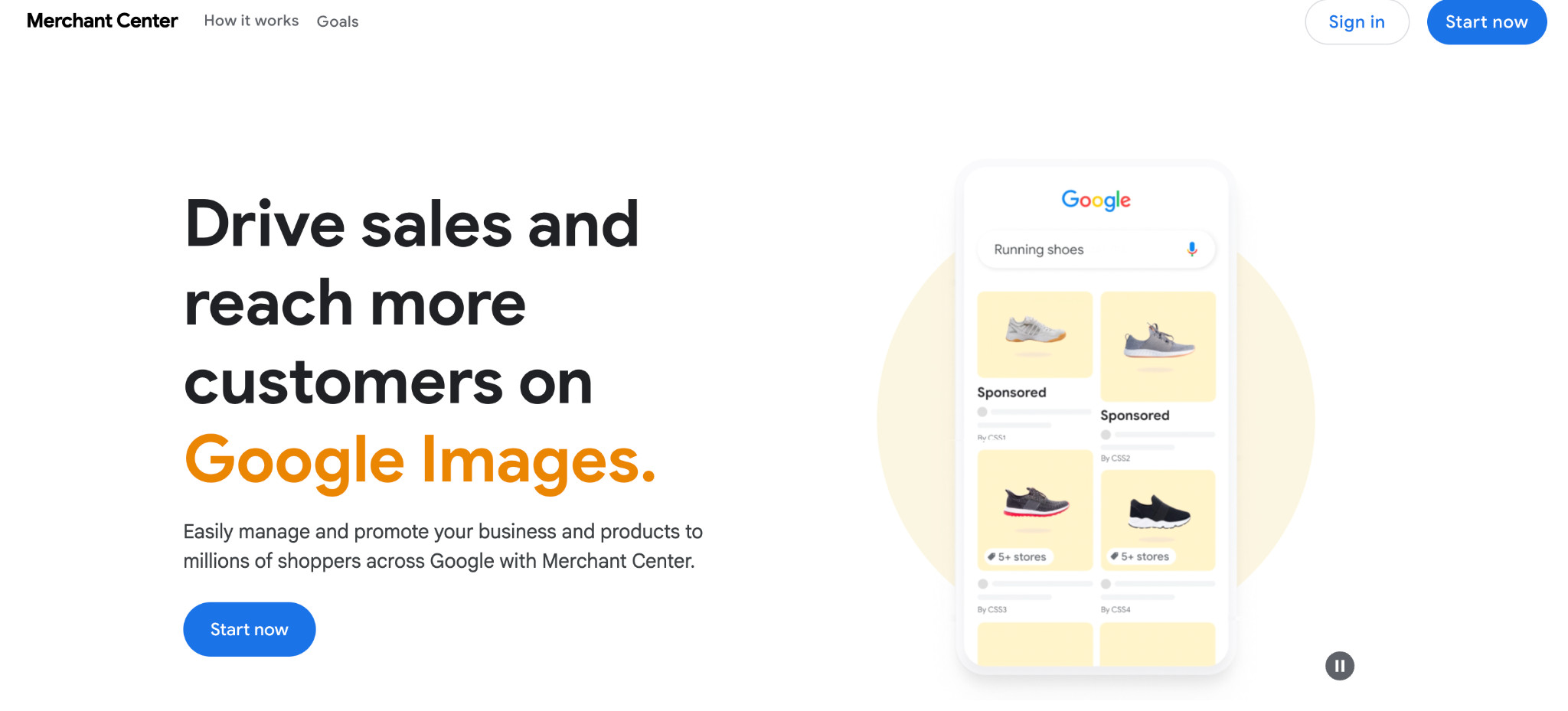
That Shopping section is powered by Google Merchant Center, and it appears before traditional organic rankings. If your feed is poorly optimized, you lose visibility before buyers even reach search results. Yet many footwear stores either skip Merchant Center entirely or set it up once and never revisit it.
Start with the fundamentals:
- Enable free listings. Merchant Center can surface products across Google Search, Images, and the Shopping tab without ad spend.
- Turn on automatic item updates so Google can sync pricing and availability directly from your site. This helps prevent feed disapprovals caused by outdated inventory data.
- Monitor your Store Quality scorecard inside Merchant Center analytics. Delivery speed, shipping costs, returns, and seller ratings all influence how competitive your listings appear when multiple stores sell similar products.
- Optimize product titles using a structure like: [Brand] + [Gender] + [Product Type] + [Key Attribute] + [Color/Material] “Nike Men’s Trail Running Shoes Wide Fit Black Mesh” gives Google far more context than “Nike Air Trail.”
- Complete every attribute field, including gender, age group, size type, color, material, and size system. Incomplete feeds limit the searches your products can appear in.
- Fix disapproved products immediately. Products with pricing mismatches or missing GTINs will not appear in Shopping results.
Strategy 7: Fix Shopify’s Built-In URL Cannibalization Issue
Shopify is generally solid on technical SEO, and most issues are handled by default. But there’s one structural problem that can quietly hurt rankings if left unchecked.
When a product belongs to multiple collections, Shopify generates a separate URL for each collection context. A single product like “Leather Oxford Shoes” can end up existing at:
- /products/leather-oxford-shoes.
- /collections/mens-dress-shoes/products/leather-oxford-shoes.
- /collections/leather-footwear/products/leather-oxford-shoes.
All three URLs lead to the exact same page. As a result, Google sees multiple versions competing for the same rankings, while ranking signals and link authority get split across different URLs.
Here’s what that looks like in practice. On many Shopify footwear stores, hovering over a product on a collection page reveals the issue immediately:
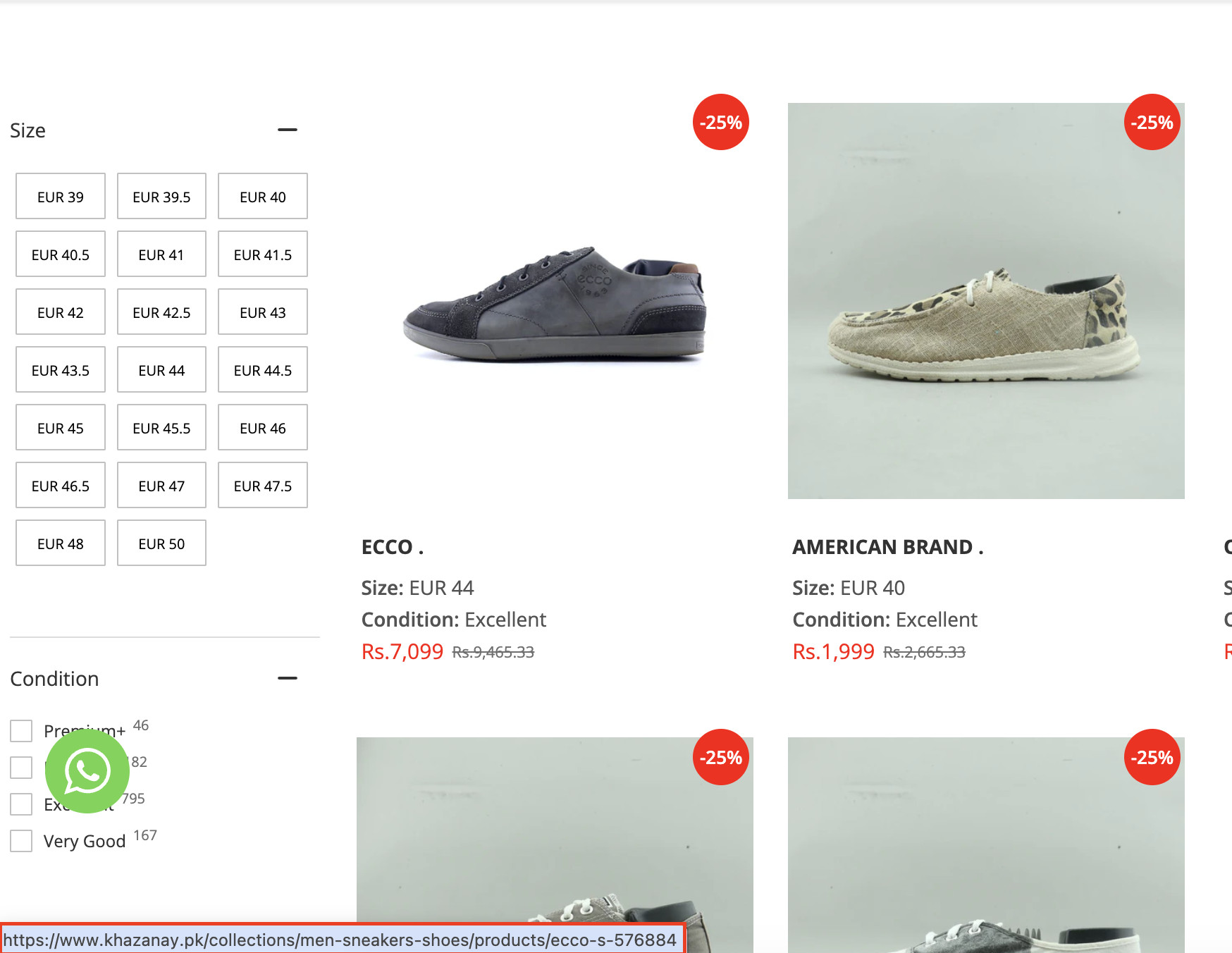
Instead of linking to the clean /products/ URL, the store is linking to the collection-context version. Every link like this sends a diluted, mixed signal to Google.
Shopify does add canonical tags pointing to the main /products/ URL, but the issue often goes beyond canonicals alone. Most Shopify themes internally link to the collection-context version when users browse collections, which reinforces the duplicate URL structure throughout the site.
The fix is straightforward:
- Always link internally to the /products/product-name version of the URL.
- Avoid linking to /collections/…/products/… URLs inside collections.
- Update theme templates so product links consistently point to the canonical URL.
- Audit collections are handled periodically, since renaming collections can generate additional duplicate URLs.
- Use 301 redirects whenever old collection URLs change.
This consolidates ranking signals into a single URL and gives Google a much clearer signal about which version of the page should rank.
Strategy 8: Build Backlinks Based on Relevance and Traffic, Not Just Domain Rating
Domain Rating (DR) is a useful shorthand but an incomplete metric for building a backlink profile that actually moves rankings. A link from a DR 80 fashion magazine with no footwear audience will contribute less than a link from a DR 45 running blog whose readers actively buy running shoes.
Relevance and traffic matter most for footwear e-commerce link acquisition. Target sites whose audiences closely match your buyers, such as running, hiking, and outdoor activity publications. Footwear fashion blogs, podiatry resources, and athletic performance sites are also strong opportunities.
A relevant link from any of these will outperform a prestigious but topically unrelated editorial placement every time.
Beyond relevance, always check the URL-level traffic of the specific page that would link to you, not just the site-level DR. Links from pages that receive real organic traffic carry a stronger signal than links from high-DR sites where the linking page itself gets no visitors.
For acquisition, these four approaches work consistently well for footwear stores:
- Send products to footwear reviewers and gear editors for roundup placements.
- Publish original research like sizing trends, return rate data, or durability comparisons.
- Find broken links on footwear resource pages and offer your content as a replacement.
- Request links from supplier, manufacturer, and stockist pages.
Strategy 9: Build a Content Strategy That Captures Demand at Every Stage
Most e-commerce stores today invest heavily in top-of-funnel content like “What are Oxford shoes?” or “How to wear running shoes.” These posts drive traffic but yield low buying intent, low conversion rates, and little measurable impact on revenue.
For footwear e-commerce, content should be built around purchase intent first. There are five content types that consistently deliver results:
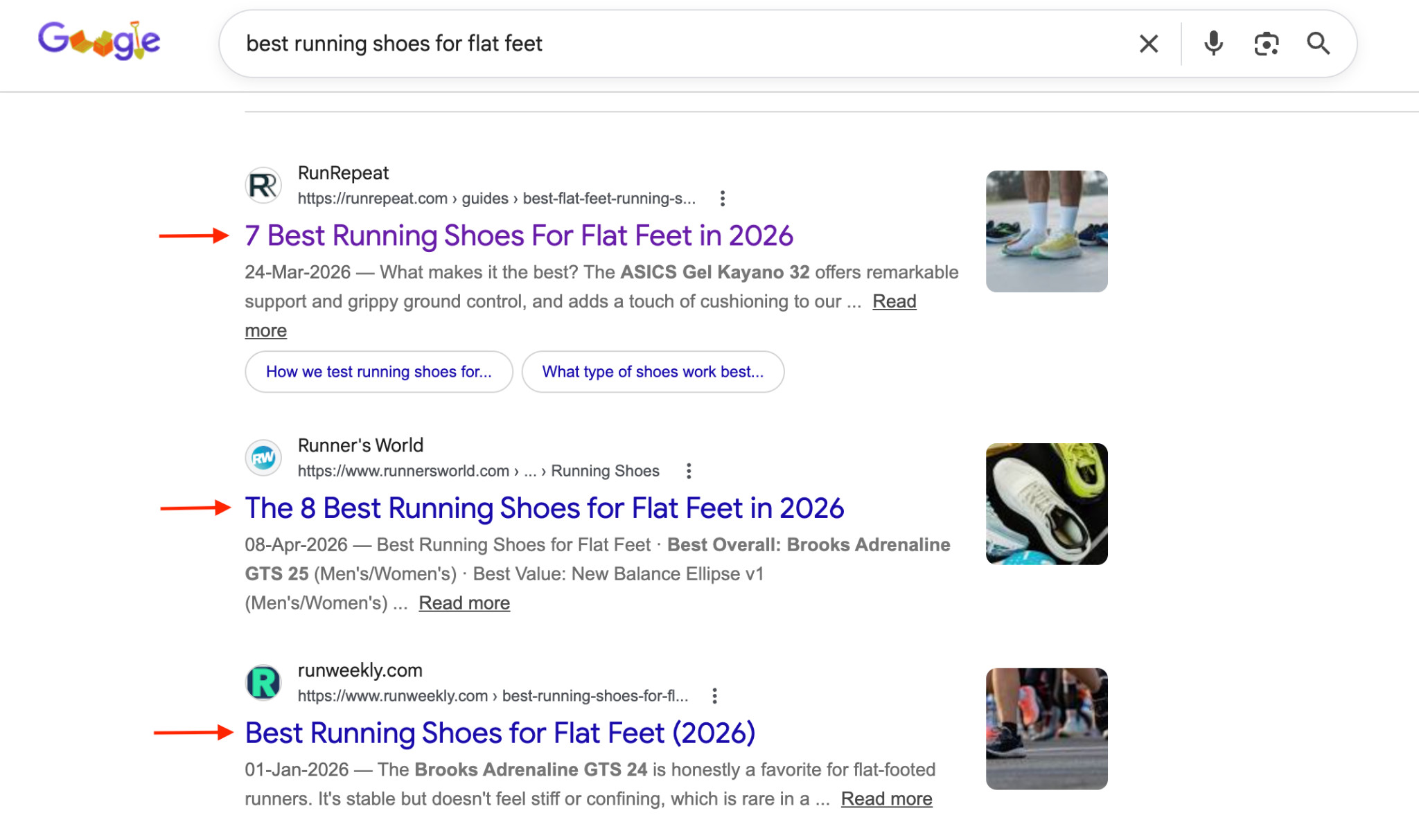
- Best-of listicles are your highest-converting content format. Queries like “best running shoes for flat feet” or “best trail running shoes for men” come from buyers who are already in the decision-making stage and just need help choosing. A well-structured listicle targeting these terms will outperform any informational blog post in both rankings and conversions.
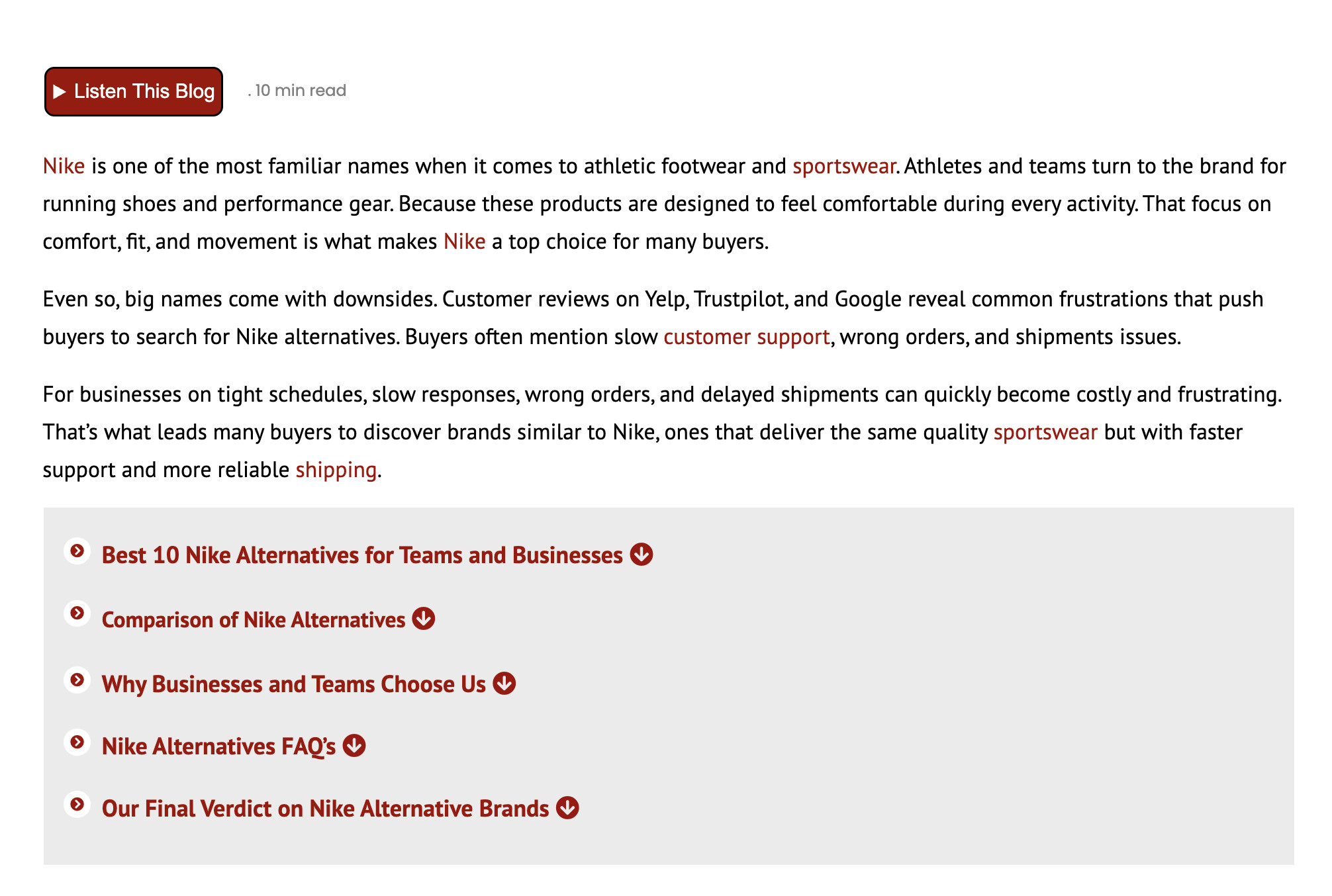
- Competitor alternatives pages target buyers who already know a brand but are exploring other options, searches like “Nike alternatives for running” or “best alternatives to [popular model].” These buyers are close to making a purchase and simply need a reason to choose you.
- Competitor and product reviews work well when there is search volume for the specific product or brand being reviewed. Before investing in a review page, verify there is actual demand in Ahrefs or Search Console. Without search volume, it is not worth the effort.
- SKU-specific pages are an underused opportunity in footwear SEO. As products become more popular, buyers start searching for exact model names or SKUs. Take “Nike Air Zoom Pegasus 41” as an example:
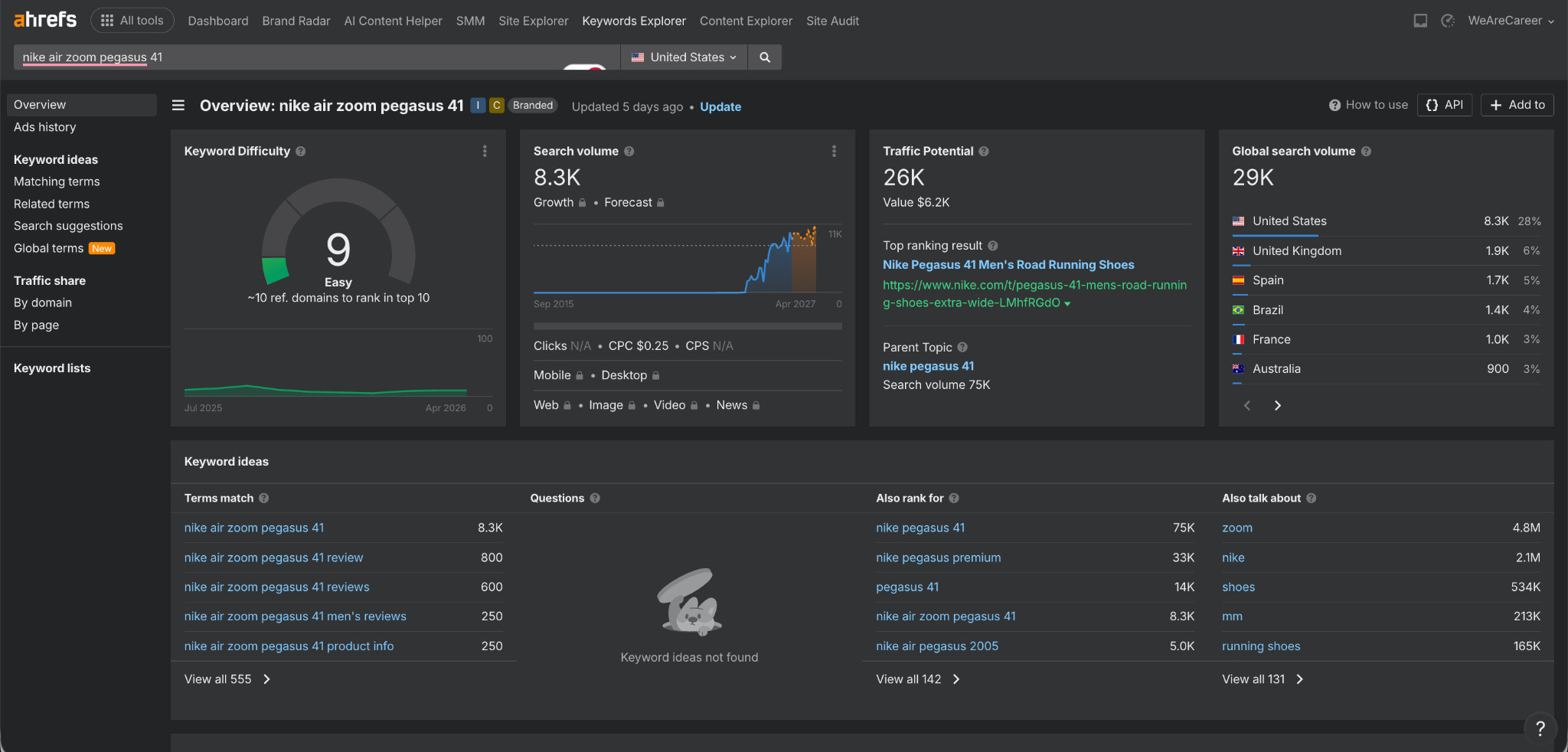
Thousands of monthly searches, strong traffic potential, and relatively low competition. Stores selling the shoe without a dedicated page for that term are handing traffic to competitors. Check Google Search Console for model-specific or SKU-based queries already generating impressions, then build dedicated pages around them.
- Discount and promo pages become relevant as your brand grows. Buyers start searching for “[brand] discount code” or “[brand] 50% off deals.” If those queries have volume, build dedicated collection pages around them with the relevant products and offers clearly listed.
Done With SEO? Here’s How To Convert the Traffic You’ve Earned
Most e-commerce stores spend heavily on SEO to attract buyers, but far fewer spend the same effort improving what happens after someone lands on the site. Getting traffic is only half the job. The other half is converting that traffic into actual sales.
Think of SEO like the cheese in a mousetrap. The cheese attracts people in, but without the trap, they leave without taking action.
For footwear brands, that usually comes down to product confidence. Buyers can’t try on shoes on a screen, and static product images often aren’t enough to help them feel confident about purchasing. Tools like 3D product viewers, AR try-on, and interactive imagery help solve that problem by giving shoppers a much better understanding of the product before they buy.
Want to improve conversions after the click? Read our footwear e-commerce conversion rate optimization guide
Frequently Asked Questions
How long does it take for Shopify SEO to show results?
Most stores see measurable ranking movement within 3–6 months for lower-competition keywords, with more competitive terms taking 6–12 months. Technical fixes like resolving URL cannibalization can show results faster, sometimes within weeks of implementation.
Should I focus on collection pages or product pages first?
Collection pages first, in almost every case. They capture broader keyword traffic, consolidate authority more efficiently, and serve buyer intent better for the majority of footwear search queries.
Does Shopify hurt SEO compared to other platforms?
Shopify has structural quirks, particularly around URL canonicalization, that can create SEO issues if left unaddressed. But the platform’s core SEO infrastructure is solid. Addressing the issues covered in Strategy 7 puts you on an equal footing with stores on any other platform.
How important is site speed for Shopify footwear SEO?
Very important. Google uses Core Web Vitals as a ranking factor, and footwear stores with heavy image galleries are particularly vulnerable to poor performance scores. Prioritize next-gen image formats, lazy loading for product images, and minimizing third-party app scripts.
Is blogging still worth investing in for footwear e-commerce?
Yes, but only for the right content types. Best-of comparisons, competitor reviews, and SKU-specific pages deliver measurable SEO value. Generic trend posts and informational content rarely convert.
How do I track whether my SEO is driving sales?
Connect Google Search Console, Google Analytics 4, and your Shopify analytics. In GA4, segment organic search traffic and measure conversion rate and revenue separately from paid. Track collection page rankings monthly against the specific keywords you’re targeting.